Canadian Passport Photo

99.8% Acceptance Rate · Guaranteed

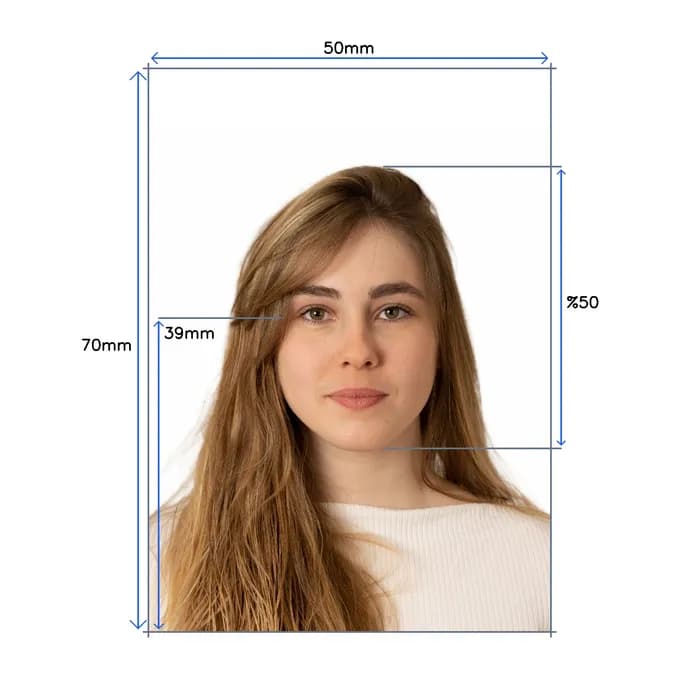
Take a selfie at home. We create a digital canadian passport photo with 50×70mm, white background, and correct head size per official standards.

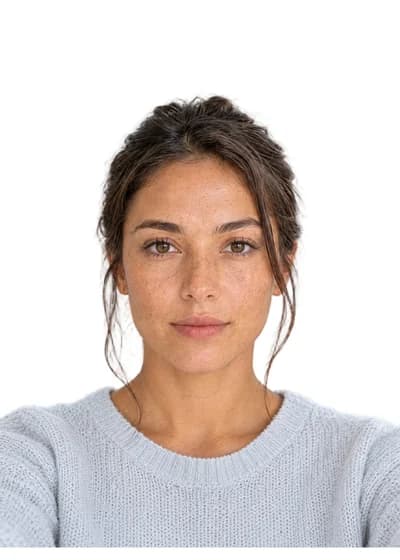
Original user photo before digital processingBefore
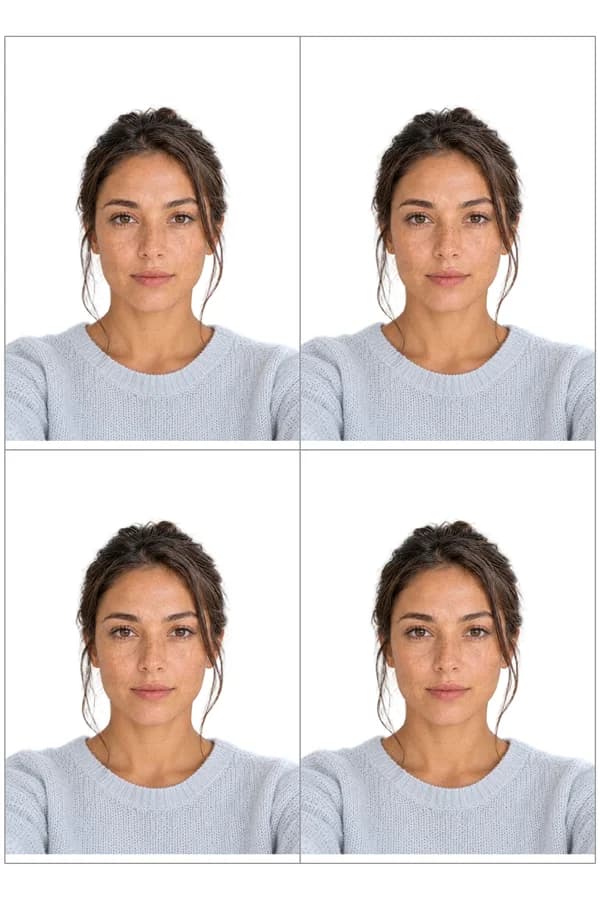
Digital Canadian Passport photo resized to official size requirements, ready for online applicationAfter
500K+photos processed
166countries supported
99.8%acceptance rate
ICAO 9303compliant
AIvalidated pre-submission
14-daymoney-back guarantee
500K+photos processed
166countries supported
99.8%acceptance rate
ICAO 9303compliant
AIvalidated pre-submission
14-daymoney-back guarantee
Hand holding a phone capturing a passport photo

Done before your coffee

Shoot at home in minutes. No drive, no line.

Caught before rejection

Measured against your country’s exact consulate spec — before you submit.

Smiling man giving an OK hand sign

Rejected? Reshoot free.

Fourteen days of free resubmissions. Refunded if it still fails.

How it works

Four steps, entirely automated. Usually done in under a minute.

  1. Snap a selfie

    1·Snap a selfie

    Any phone, any lighting. Front camera works.

  2. AI validates it

    2·AI validates it

    Face, eyes, framing checked against spec in seconds.

  3. Background swapped

    3·Background swapped

    Clean, official-compliant backdrop applied automatically.

  4. Cropped to size

    4·Cropped to size

    2×2, 35×45, or whatever your country's spec calls for.

Canadian Passport Photo Check

Instant • Professional • Guaranteed

Instantly verify your photo meets Canadian Passport requirements. Get it right the first time.

25+
Validation Points
99%
Acceptance Rate
7
Check Categories

Biometric Compliance

Face detection, eye visibility, pose alignment

Technical Quality

Resolution, lighting, focus, contrast

Canadian Passport Standards

Official requirements, compliance guidelines

Validated using Canadian Passport official requirements

AI Canadian Passport photo validation interface showing real-time analysis results
Real-time Analysis

Take perfect photos at home

A five-minute setup. Any smartphone will do.

  1. Step 1: Body-camera distance - instruction for taking the perfect passport photo
    1

    Body-camera distance

    Position yourself min 16-20 inch from the camera. Ensure your head, neck, and upper shoulders are visible in the frame.

  2. Step 2: Posture: straight ahead - instruction for taking the perfect passport photo
    2

    Posture: straight ahead

    Keep your head straight and centered. Look directly at the camera with a neutral expression, mouth closed, and eyes open.

  3. Step 3: Lighting on both sides of the face - instruction for taking the perfect passport photo
    3

    Lighting on both sides of the face

    Use natural lighting for even illumination. Avoid shadows and ensure all facial features are clearly visible.

Print your Canadian Passport Photo same day

Walgreens, CVS & Walmart · under $1 for 4 photos

How to Print Your Photo

1

Download your digital photo

After checkout, download the print-ready file to your phone or computer

2

Visit CVS, Walgreens, or Walmart photo center

Use their app or in-store kiosk to upload your photo

3

Print as 4x6 photo

Your file includes 4 passport-size photos on one 4x6 print

Print ready in 1 hour • No appointment needed

Canadian Passport specifications

Official requirements · compliant standards

Size

50 x 70 mm

Resolution

600 dpi

Position

Head covers 50% of the photo

Background Color

#ffffff

Not Permitted

Hats and caps (except religious), Sunglasses, Heavy makeup

Official Site Link

Passport photo requirements to create photo online
Official Standards
Last update: 1/12/2026
Written bySandra - Author AvatarSandra
Expert verified

Important Details When Taking a Canada Passport Photo

Taking a passport photo for Canada might sound tricky, but it's actually straightforward once you know the basics. In fact, with a few simple guidelines, you can avoid common mistakes and ensure your pictures are accepted on the first try. Below we break down the core requirements in clear, friendly terms – and show how you can get a compliant photo without even visiting a studio.

Core Requirements for Canadian Passport Photos

The standard Canadian passport photo size is 50 mm wide by 70 mm high (about 2 inches by 2¾ inches). The distance from your chin to the top of your head in the picture should be between 31 mm and 36 mm, ensuring your face is large and clear. You'll need to submit two identical photos meeting these specs with your application.

  • Background & Lighting: Use a plain white or light-colored background with no patterns or distractions. Good lighting is important – make sure it's even and there are no harsh shadows or glare on your face or behind you.
  • Expression & Pose: Face the camera directly with a neutral expression. Keep your eyes open and clearly visible, and don't smile or frown (a neutral, relaxed look is best). Your head and shoulders should be straight and centered in the frame (no tilting) so that the photo shows a full front view of your face.
  • Recency: The photo must be recent – taken within the last six months – so that it reflects what you look like now. Using an up-to-date photo helps the passport office confirm your identity from your current appearance.
  • Print Quality: Always print your photos on high-quality photo paper. The passport office won't accept images printed at home on an inkjet or on thick cardstock – officials specifically require photos to be professionally printed on plain photo paper. (Tip: you can get them printed at a pharmacy or photo lab to meet this requirement.)
  • Glasses & Headwear: You can wear your regular prescription glasses in the photo as long as there's no glare and your eyes are clearly visible. However, sunglasses or tinted lenses are not allowed, even if they're prescription, because your eyes must be seen clearly. Remove any hats or head coverings as well, unless they're worn daily for religious or medical reasons – and even then, your full face must be visible and free of shadows. (If you do keep a religious head covering on, ensure it doesn't obscure any part of your face.)

Stamp or Signature on the Back

According to Canada passport photo rules, on the back of 1 photo there must be a stamp or written information showing the date the photo was taken, name and complete address of the photo studio.

You can just put a signature of the person who took the photo (the original photographer) or someone else who knows you and can confirm your identity. Having done thousands of Canada passport photos online, our clients used this method and had their photos successfully accepted.

Snap2Pass: Take Your Passport Photo the Easy Way

Worried about getting all these details right? You don't have to be! Snap2Pass makes the process of taking a Canadian passport photo friendly and hassle-free. With Snap2Pass, you can snap your own picture at home (we'll guide you to ensure it meets all the requirements we talked about) and then have it printed on real photo paper at a nearby Walgreens or CVS. This means you get the convenience of an online solution and a professional-quality print that Passport Canada will accept. No need to pay extra for a photographer or stress over the exact photo dimensions – Snap2Pass helps you get a perfectly compliant photo in just a few clicks. It's a simple, cost-effective way to get your Canadian passport photos done right, so you can apply for your passport with confidence!


Sources: Community feedback and official guidelines were used to compile these tips. For more detailed information, you can refer to:

Good luck with your passport application!

Common questions, answered

Everything you need to know before you upload. Tap any question to expand.

Supported documents, worldwide

Every country · current 2025 regulations · ICAO compliant