Indian OCI Photo99.8% Acceptance Rate · Guaranteed
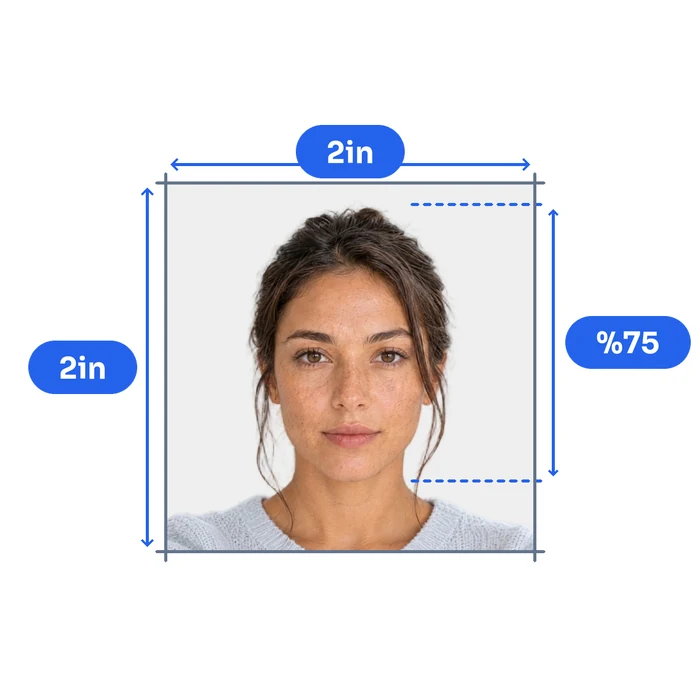
Take a selfie at home. We create a square 2×2 inch OCI photo at 600×600 pixels with white background — ready to upload to ociservices.gov.in in seconds.
Before
AfterWhy Choose Snap2Pass
Lightning Fast
Advanced AI technology processes your photo in seconds, delivering professional results instantly.
AI Expert Review
AI-powered computer-vision algorithms verify size, lighting, background, and framing against photo standards.
Guaranteed Approval
If authorities reject your photo, we'll fix it for free or refund you - no hassle, no risk.
Indian OCI Photo CheckInstant • Professional • Guaranteed
Instantly verify your photo meets Indian OCI requirements. Get it right the first time.
Biometric Compliance
Face detection, eye visibility, pose alignment
Technical Quality
Resolution, lighting, focus, contrast
Indian OCI Standards
Official requirements, compliance guidelines
Validated using Indian OCI official requirements

Take Perfect PhotosAt Home
Professional Results • No Technical Skills Needed

Body-camera distance
Position yourself min 16-20 inch from the camera. Ensure your head, neck, and upper shoulders are visible in the frame.

Posture: straight ahead
Keep your head straight and centered. Look directly at the camera with a neutral expression, mouth closed, and eyes open.

Lighting on both sides of the face
Use natural lighting for even illumination. Avoid shadows and ensure all facial features are clearly visible.
Ready in under 5 minutes • Works with any smartphone
Print Your Indian OCI PhotoSame Day
Walgreens, CVS & Walmart • Under $1 for 4 Photos
How to Print Your Photo
Download your digital photo
After checkout, download the print-ready file to your phone or computer
Visit CVS, Walgreens, or Walmart photo center
Use their app or in-store kiosk to upload your photo
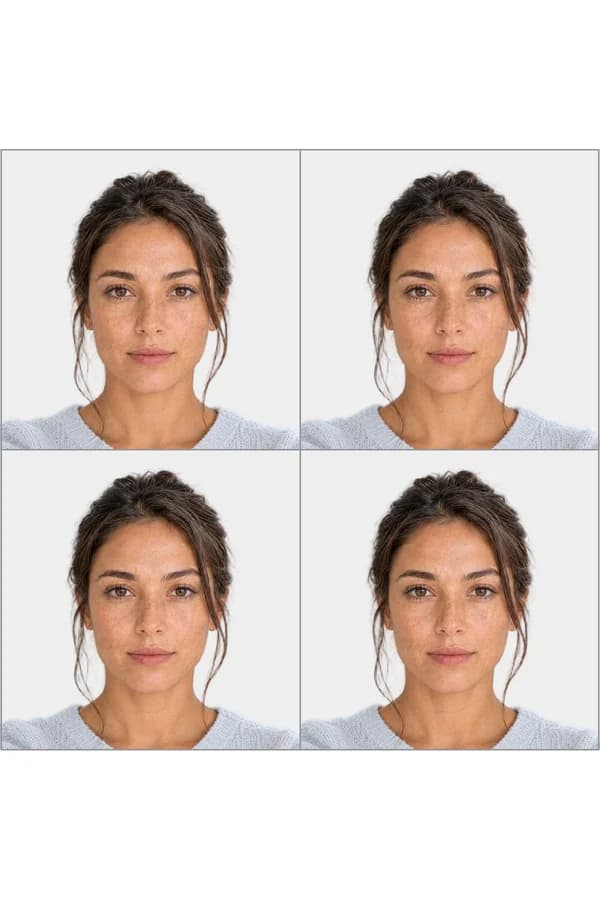
Print as 4x6 photo
Your file includes 4 passport-size photos on one 4x6 print
Print ready in 1 hour • No appointment needed
Indian OCI SpecificationsMade Simple
Official Requirements • Compliant Standards
Size
Resolution
Position
Background Color
Not Permitted
Official Site Link

Important Details When Taking an Indian OCI Card Photo
The Overseas Citizen of India (OCI) card is a lifelong visa and identity document for foreign nationals of Indian origin. Whether you are applying for a new OCI registration, renewing after a passport change, or updating your card after turning 20 or 50, your photo and signature images must meet strict specifications set by the Ministry of Home Affairs. A non-compliant photo or signature is one of the top reasons OCI applications are returned, adding weeks of delay.
OCI Photo Requirements We Comply With:
-
Size & Dimensions: The photo must be a square, measuring 2 x 2 inches (51 x 51 mm) for physical prints. Digital uploads must be between 200 x 200 pixels (minimum) and 1500 x 1500 pixels (maximum), with equal height and width.
-
Background: The official specification calls for a plain light-colored background (not pure white). Acceptable options include off-white, light grey, or light blue. This differs from many other countries that require pure white.
-
Face Coverage: Your face must occupy at least 80% of the frame. The photo should show a full front view of your head and shoulders, with your face centered.
-
File Format & Size: Digital uploads must be JPEG/JPG format, with a maximum file size of 500 KB.
-
Recency: Photos must be taken within the last 6 months. For OCI Miscellaneous Services (renewal/update), some consulates require photos taken within 30 days.
-
Color & Quality: Photos must be in full color with natural skin tones. No digital filters, retouching, or Photoshop alterations of any kind. The image must not be pixelated or blurry.
-
Expression & Pose: Face the camera directly with a neutral expression. Eyes must be open, mouth closed. No tilting, no side profiles.
-
Glasses: Glasses are not recommended for the digital upload. If worn, there must be absolutely no glare or reflections, and your eyes must be fully visible.
-
Head Coverings: Head coverings are permitted only for religious reasons. Your full face, from the bottom of your chin to the top of your forehead, must remain visible.
-
Attire: Wear everyday clothing that contrasts with the background. Avoid white or very light shirts that blend into the background.
Who Needs an OCI Card and When Is Renewal Required?
The OCI card is available to foreign nationals who were citizens of India (or whose parents, grandparents, or great-grandparents were Indian citizens) on or after January 26, 1950. Spouses of Indian citizens or existing OCI cardholders are also eligible after two years of continuous marriage. Nationals of Pakistan and Bangladesh are not eligible.
Mandatory OCI Card Re-issuance:
| Age Bracket | Requirement |
|---|---|
| Under 20 years | OCI card must be re-issued each time a new passport is acquired |
| After turning 20 | One-time re-issuance required with the first passport renewal after age 20 (to capture adult facial features) |
| 21 to 50 years | Re-issuance is not mandatory when renewing your passport |
| After turning 50 | One-time re-issuance required with the first passport renewal after age 50 (to capture age-related changes) |
OCI Application Types That Require Photos
| Service | Purpose | Photo Required | Signature Required |
|---|---|---|---|
| New OCI Registration | First-time OCI card for eligible foreign nationals | Yes | Yes |
| OCI Re-issuance | Mandatory re-issuance at age milestones (under 20, after 20, after 50) | Yes | Yes |
| OCI Miscellaneous Services | Update OCI record when renewing passport (ages 21-50) | Yes | No (online update only) |
| Lost/Damaged OCI Card | Replacement for lost, stolen, or damaged OCI cards | Yes | Yes |
All applications are submitted through the official portal at ociservices.gov.in.
Digital Upload Requirements
Applicant Photo:
- Format: JPEG/JPG
- Aspect ratio: 1:1 (square)
- Minimum: 200 x 200 pixels
- Maximum: 1500 x 1500 pixels
- Max file size: 500 KB
Applicant Signature (Critical):
The OCI signature upload is one of the most common failure points. The portal enforces strict dimension validation.
- Format: JPEG/JPG
- Aspect ratio: 1:3 (height:width) -- the width must be exactly three times the height
- Minimum: 200 x 67 pixels (width x height)
- Maximum: 1500 x 500 pixels (width x height)
- Max file size: 500 KB
- The signature must be on a plain white background with dark ink
- No printed or typed signatures -- it must be a scan or photo of your handwritten signature
How to get the signature right: Sign on plain white paper with a dark pen, photograph or scan it, then crop to a 3:1 width-to-height ratio. For example, 600 x 200 pixels or 900 x 300 pixels both work. Our tool includes a dedicated OCI signature cropper that handles this automatically.
OCI vs. Passport Seva vs. e-Visa: Know the Difference
Indian photo requirements vary significantly across application types. Using the wrong specs is a common reason for rejection.
| Specification | OCI Card (Digital) | Indian Passport (Passport Seva) | Indian e-Visa |
|---|---|---|---|
| Photo Shape | Square (1:1) | Square (1:1) | Square (1:1) |
| Print Size | 2 x 2 inches (51 x 51 mm) | 2 x 2 inches (51 x 51 mm) | No print required |
| Digital Dimensions | 200x200 to 1500x1500 px | 350x350 to 1000x1000 px | Square, min 350x350 px |
| Max File Size | 500 KB | 300 KB | 1 MB |
| Background | Light color (not white) | White | White |
| Glasses | Not recommended | Not permitted | Not permitted |
| Signature Image | Required (1:3 ratio) | Not required | Not required |
| Application Portal | ociservices.gov.in | passportindia.gov.in | indianvisaonline.gov.in |
For detailed requirements on other Indian document types, see our guides on Indian Passport Photos and Indian Visa Photos.
Common Mistakes That Cause Rejections
- Wrong signature aspect ratio -- The 1:3 (height:width) requirement trips up most applicants. The portal will reject uploads that do not match this ratio exactly.
- Pure white background -- Unlike most countries, the OCI portal specifies a "plain light color background (not white)." Using a pure white background may trigger a rejection.
- Reusing an old photo -- Photos must be recent. Never reuse the photo from your previous OCI card or passport application.
- File too large or wrong format -- Only JPEG/JPG is accepted. PNG, HEIC, and PDF files will be rejected outright.
- Face coverage too small -- Your face must fill at least 80% of the frame. Standard passport photos from other countries often have more background space and may not meet this threshold.
- Digitally altered photos -- Any visible retouching, filters, or Photoshop work will result in rejection.
- Photo dimensions not square -- The height and width must be exactly equal. Rectangular crops are rejected.
Conclusion
The OCI card photo has unique requirements that set it apart from Indian passports and e-Visas, particularly the light-colored (not white) background, the 80% face coverage rule, and the strict 1:3 signature image ratio. Our tool validates all of these specifications automatically, including the signature dimensions, so you can submit with confidence and avoid the back-and-forth that delays so many OCI applications.
Common QuestionsAnswered
Everything You Need to Know
Supported DocumentsWorldwide
All Countries • Current 2025 Regulations • ICAO Compliant